
Fast Chrome Startup with Tab Unloading
Overview
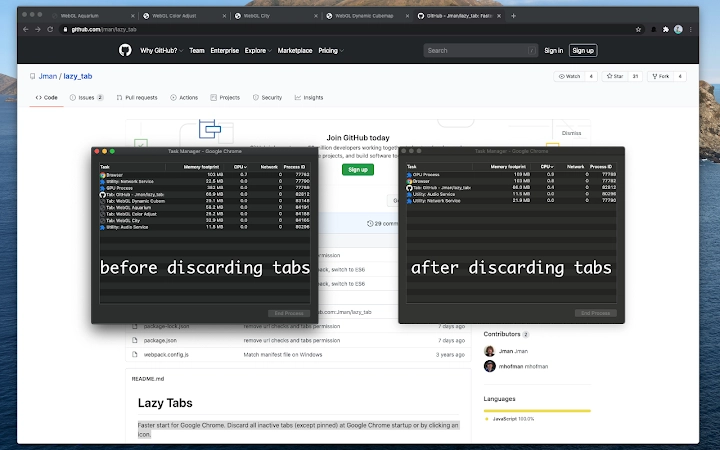
The software is designed to improve the startup performance of Google Chrome by automatically unloading inactive tabs—excluding pinned tabs—when the browser launches. This functionality helps reduce memory consumption and accelerates the initial load time, making the browsing experience more efficient. The tool targets users who rely on Chrome for daily productivity and frequently open multiple tabs, which can slow down startup times over time. It is particularly useful for professionals, researchers, and power users managing numerous web pages across work and personal tasks.
By focusing on tab management at startup, the software addresses a common pain point: slow Chrome launches due to heavy tab loads. The solution is straightforward and purpose-built, aiming to streamline workflow without requiring complex configuration. While the developer’s background is not specified, the software operates as a lightweight utility integrated with Chrome, suggesting a focus on simplicity and performance. Real-world usage includes preparing for a workday with a fast-booting browser or reducing resource strain on older systems.
Key Features & Capabilities
- Automatic Tab Unloading at Startup – When Chrome launches, inactive tabs (excluding pinned ones) are unloaded from memory, reducing initial load time and freeing up system resources.
- Manual Trigger via Icon – A dedicated icon allows users to initiate tab unloading on demand, offering flexibility for users who want to clean up their session mid-session.
- Pinned Tab Preservation – Pinned tabs are intentionally retained in memory, ensuring that essential tools and frequently used pages remain accessible immediately after startup.
- Lightweight Design – With a file size of 1.5 MB, the software is compact and minimizes system impact, making it suitable for devices with limited storage or performance.
- Seamless Chrome Integration – The tool functions as a native extension within Chrome, requiring no external processes or complex setup.
These features support efficient workflow management by preventing Chrome from being bogged down by unused tabs. For example, a researcher opening Chrome after a long break can benefit from a faster startup without losing access to pinned reference pages. Similarly, a designer working across multiple project tabs can trigger unloading mid-session to regain performance.
User Interface, Workflow & Performance
The software integrates directly into the Chrome browser interface, with a minimal icon in the toolbar. Navigation is intuitive, requiring no additional windows or configuration panels. Users interact with the tool by clicking the icon or relying on automatic behavior at startup. The workflow is streamlined: once installed, the software operates in the background without user intervention.
Performance observations are based on general software behavior patterns. The developer did not specify resource usage details, such as CPU or RAM impact. However, the lightweight design and focused functionality suggest low overhead. Stability is expected to be consistent, as the tool performs a single, well-defined task without complex operations. No known issues with crashes or browser conflicts were reported in the release notes.
Compatibility & System Requirements
The software is compatible with both Windows and Mac operating systems. It functions as a Google Chrome extension, meaning it requires Chrome to be installed and updated to a compatible version. The installation size is 1.5 MB, which is minimal and suitable for most devices. The developer did not specify exact system requirements, including minimum RAM, processor, or storage levels.
Compatibility information was partially provided. While the software is designed for Chrome, the specific Chrome version range is not listed. Users should ensure their Chrome browser is up to date to avoid potential incompatibility. The tool does not appear to require administrative privileges for installation.
Pros and Cons
Pros
- Reduces Chrome startup time by unloading inactive tabs
- Preserved pinned tabs ensure access to essential pages
- Lightweight at only 1.5 MB
- Simple, intuitive interface with minimal setup
- Free to use with no hidden costs
Cons
- No visible control panel or advanced settings
- Exact system requirements not specified
- Only works within Google Chrome, not other browsers
- Manual unloading requires user action
- Limited feedback on performance gains
FAQ Section
Is this software compatible with all versions of Chrome?
The software is designed for Google Chrome, but the specific version compatibility range was not provided. Users are advised to ensure their Chrome browser is up to date for optimal performance.
Does the tool work on both Windows and Mac?
Yes, the software supports both Windows and Mac operating systems, as stated in the product information.
Is the software safe to install?
As a Chrome extension with a file size of 1.5 MB, the software is designed to operate within Chrome’s security model. No malicious behavior was reported in the release notes. Users should install from official sources to ensure authenticity.
Can I update the software automatically?
Updates are managed through the Chrome Web Store. The software will update automatically if enabled in the browser’s extension settings.
Does the software require an internet connection?
The tool functions primarily offline once installed. However, updates and initial installation require an internet connection.
Final Thoughts + CTA
Fast Chrome Startup with Tab Unloading delivers a focused, effective solution for users struggling with slow Chrome launches. Its lightweight design, automatic startup behavior, and pinned tab preservation make it a practical tool for enhancing daily productivity. While it lacks advanced configuration options, its simplicity is a strength for users who value efficiency over complexity. The free price point adds significant value, especially for professionals managing heavy tab workloads.
Download Fast Chrome Startup with Tab Unloading now.







